Shadow AI Risk: How Employees Using ChatGPT, Claude & AI Tools Are Creating Hidden Security Gaps
AI Tools Are Everywhere in Your Organisation Right Now — Is Your Security Team Keeping Up?
Walk around almost any office today and you’ll find people quietly using ChatGPT, Claude, Gemini, or a dozen AI-powered apps to get work done faster. Marketing teams are drafting content with AI. Finance teams are building dashboards with it. HR is summarising resumes with it. And in most organisations, nobody in IT or security signed off on any of it.
Here’s a simple way to picture it. Think of generative AI tools like USB drives in the early 2010s — incredibly useful, adopted instantly by employees, and almost completely unmanaged by IT until something went wrong. The difference this time is the data going into these tools isn’t just files — it’s prompts, customer data, financial models, source code, and strategy documents, typed directly into third-party AI systems.
This isn’t a reason to ban AI — that ship has sailed, and banning it just pushes usage underground. It’s a reason to understand what’s actually happening, so you can build sensible guardrails instead of finding out about a data leak after the fact.
How Generative AI Actually Works — A Quick Primer for Non-Technical Leaders
You don’t need to become a data scientist to lead security decisions around AI — but understanding the basics helps you ask the right questions. Here’s the short version.
Generative AI tools — ChatGPT, Claude, Gemini, and similar — are built on Large Language Models (LLMs). These sit inside a larger hierarchy: Artificial Intelligence is the broad umbrella, Machine Learning is systems that learn patterns from data, Deep Learning is the brain-inspired networks behind modern AI, and LLMs are the specific models trained to understand and generate human language.
What Happens to Your Text the Moment You Hit Enter
When an employee types a prompt into an AI tool, that text gets broken into small chunks called tokens, converted into numerical representations, and processed by the model to predict the most likely response, word by word. The important part for security leaders: that text has now left your organisation’s boundary and entered a third-party system — and depending on the platform and its settings, it may be stored, logged, or even used to improve the provider’s models.
This is exactly why “shadow AI” — AI tools used without IT’s knowledge — deserves the same attention security teams once gave to shadow IT and unsanctioned cloud storage.
The AI Toolkit Your Employees Are Already Using (Whether You Know It or Not)
Based on what we’re seeing across client environments, here’s a realistic snapshot of the kind of AI tooling that’s already in active use across most mid-size and large organisations — broken down by what each category does, and what it means for your risk posture.
General-Purpose AI Assistants
ChatGPT, Claude, Gemini, Microsoft Copilot, Meta AI, and Grok are the everyday workhorses — used for drafting emails, summarising documents, writing code, and answering questions. Some of these have enterprise tiers with stronger data controls; most employees are using free or personal-tier accounts, where data handling policies are far less protective.
The risk: An employee pastes a customer contract, a piece of source code, or an internal financial model into a free-tier AI tool to “get a quick summary.” That data is now outside your control, with no audit trail and no DLP visibility.
Model Marketplaces and Comparison Tools
Platforms like OpenRouter give access to hundreds of AI models from different providers through a single interface, while tools like GetMulti let users send one prompt to multiple models simultaneously and compare the outputs. Convenient for getting better answers — but it also means a single prompt (potentially containing sensitive data) might get routed to several different third-party providers at once, each with their own data policies.
AI Meeting Assistants
Tools like Fireflies.ai automatically join Zoom and Google Meet calls, transcribe everything said, generate summaries and action items, and can even be queried later for “what was discussed about X.” These tools often integrate directly with other AI assistants via connectors.
The risk: Every confidential discussion — board meetings, M&A conversations, security incident reviews, salary negotiations — that happens on a call with one of these bots present is now a searchable, AI-readable transcript stored on a third-party platform. Has anyone reviewed who has access to those transcripts, and for how long they’re retained?
Document and Knowledge-Base Tools
Tools like NotebookLM let users upload large documents — financial reports, contracts, prospectuses, internal policies — and “chat” with them to extract specific information quickly. Similarly, Claude Cowork and similar tools can read dozens of local files in parallel, summarising entire folders of sensitive documents in minutes.
The risk: These tools are genuinely useful for productivity — but uploading a folder of HR records, legal contracts, or unreleased financial results into any AI platform, even a reputable one, needs to go through the same data classification and approval process as any other third-party data transfer. Most employees don’t think of it that way; to them, it just feels like “using a smarter search bar.”
Deep Research and Due-Diligence Tools
Both ChatGPT and Claude now offer “Deep Research” modes that run dozens or hundreds of web searches over 10-15 minutes to produce a fully cited report on a topic — used for investment research, competitor analysis, and due diligence on companies or individuals.
Why this matters to you: if your competitors, threat actors, or even disgruntled former employees can run a “Deep Research” report on your organisation in 15 minutes — pulling together every public breach disclosure, every LinkedIn post about your tech stack, every job posting revealing your internal tools — so can the people targeting you. This is a preview of how reconnaissance for social engineering and targeted attacks is changing.
People-Search and Networking Tools
Tools like Happenstance connect to an individual’s LinkedIn, Gmail, and social accounts to map out their professional network and find “warm paths” to people at target companies — originally built for job-seekers looking for referrals.
The risk: The exact same capability is a gift to social engineers. An attacker researching your organisation can use similar tools to map your org chart, identify who reports to whom, find personal email addresses, and build a highly convincing pretext for a phishing or vishing attempt — all without ever touching your network.
Agentic AI Browsers
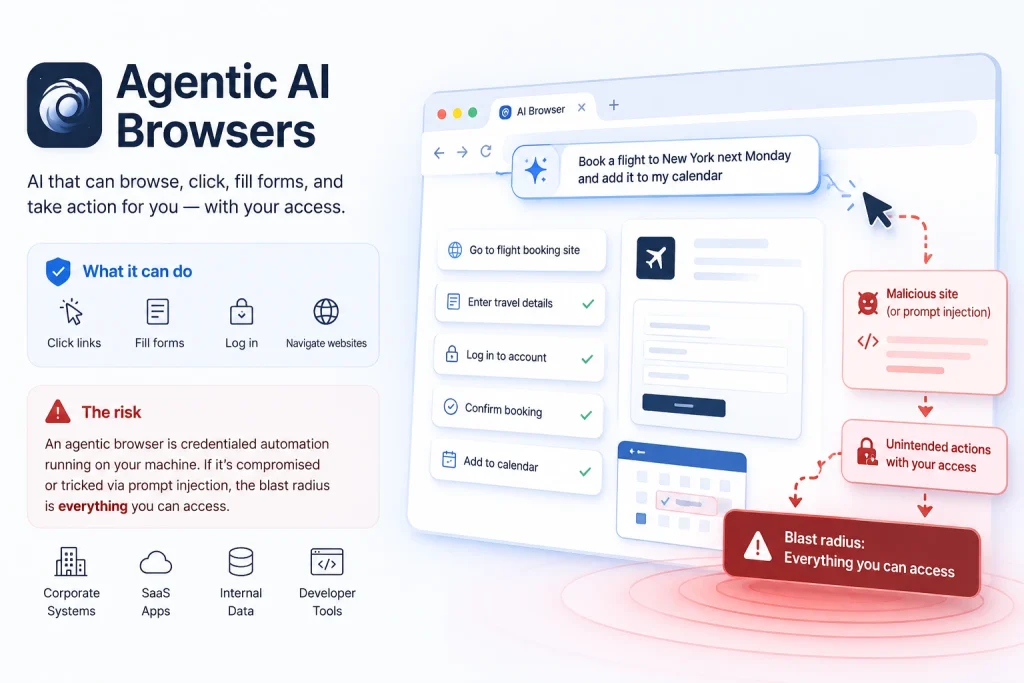
Tools like Perplexity’s Comet are “agentic” browsers — an AI assistant that can take control of the browser, click links, fill in forms, and navigate websites on a user’s behalf, based on natural-language instructions.
The risk: An agentic browser that can log into systems and fill forms on a user’s behalf is, functionally, a new kind of credentialed automation running on an employee’s machine — with all the access that employee has. If that browser extension itself is compromised, or tricked via a malicious webpage into taking unintended actions (a technique often called “prompt injection”), the blast radius is everything that employee can access.
Prompt Injection: The New Attack Vector Every CISO Should Know About
As AI tools move from “answering questions” to “taking actions” — browsing the web, reading emails, managing calendars, executing code — a new category of attack has emerged that most traditional security tools were never designed to catch: prompt injection.
Here’s the simplest way to understand it. Imagine you hire a very capable, very obedient assistant who will follow any instruction written down in front of them — including instructions hidden inside a document, email, or webpage they’re reading on your behalf. An attacker who can get malicious instructions in front of that assistant — buried in a webpage, a PDF, or an email — can potentially hijack what the assistant does next, using your assistant’s own access against you.
Why This Matters Now, Not Eventually
As more employees adopt AI agents and agentic browsers that can read content and take actions, the attack surface for prompt injection grows with every new integration — every connected inbox, every browsed webpage, every uploaded document becomes a potential delivery mechanism. This is a category of risk that didn’t meaningfully exist three years ago, and most organisations have no process for testing it.
What This Means for You as a CIO, CTO, or CISO
You Can’t Secure What You Can’t See
The first step isn’t a policy document — it’s visibility. Understanding which AI tools are actually in use across your organisation (through network monitoring, browser extension audits, and honest conversations with department heads) gives you the real picture, which is usually far broader than IT’s official “approved tools” list suggests.
Data Classification Needs an “AI Lens”
Your existing data classification policy (public, internal, confidential, restricted) is a good foundation — but it needs an explicit AI clause. Employees need clear, simple guidance: which categories of data are acceptable to paste into AI tools, which require an enterprise-tier account with data protection guarantees, and which should never go into any AI tool at all.
Your Attackers Are Already Using These Same Tools
Every productivity gain available to your employees — faster research, better-written content, automated reconnaissance — is equally available to threat actors targeting your organisation. AI-assisted phishing emails are harder to spot because the grammar is perfect and the tone matches your brand voice. AI-assisted reconnaissance can map your organisation’s public footprint in minutes. Your security awareness training needs to evolve to reflect this.
AI Adoption Deserves a Line Item in Every Risk Assessment
When your team evaluates a new vendor, a new integration, or a new internal tool, “does this involve an AI component, and if so, where does the data go” should now be a standard question — alongside the usual questions about encryption, access control, and compliance.

A Practical Starting Point — Not a Ban
Banning AI tools outright is rarely realistic, and almost always backfires — employees simply switch to personal devices and unmonitored accounts, which is worse for visibility, not better. A more realistic approach looks like this:
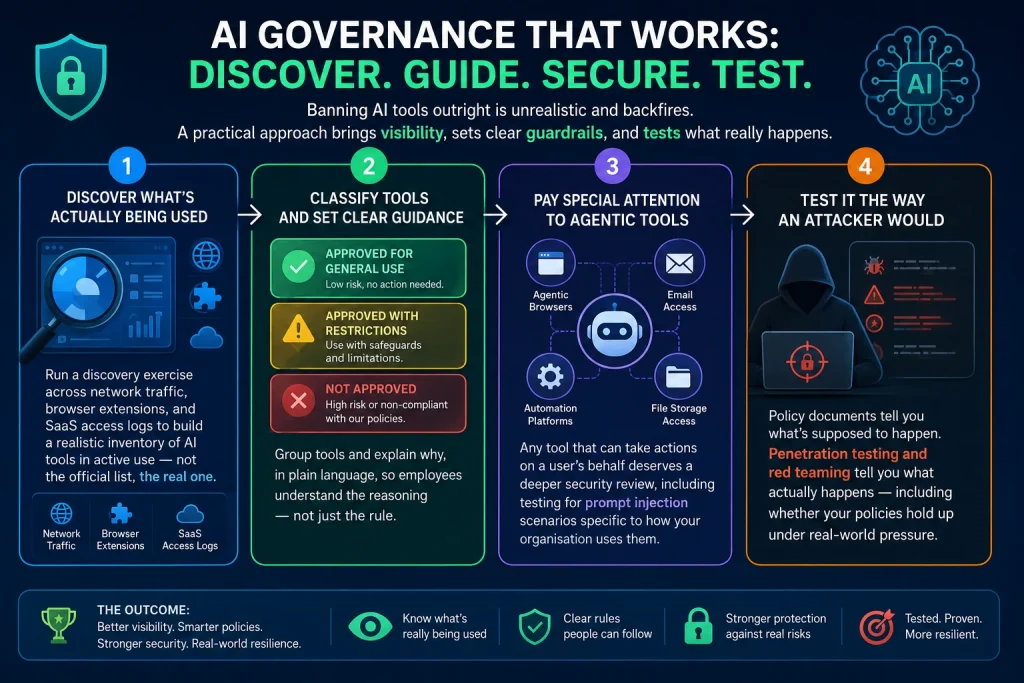
Step 1 — Discover What’s Actually Being Used
Run a discovery exercise across network traffic, browser extensions, and SaaS access logs to build a realistic inventory of AI tools in active use — not the official list, the real one.
Step 2 — Classify Tools and Set Clear Guidance
Group tools into “approved for general use,” “approved with restrictions,” and “not approved” — and explain why, in plain language, so employees understand the reasoning rather than just the rule.
Step 3 — Pay Special Attention to Agentic Tools
Any tool that can take actions on a user’s behalf — agentic browsers, automation platforms, AI tools with connector access to email or file storage — deserves a deeper security review, including testing for prompt injection scenarios specific to how your organisation uses them.
Step 4 — Test It the Way an Attacker Would
Policy documents tell you what’s supposed to happen. Penetration testing and red teaming tell you what actually happens — including whether your “do not paste sensitive data into AI tools” policy survives contact with a busy employee on a deadline, and whether a crafted prompt-injection payload in a shared document can actually trigger unintended actions in your environment.
How Access0day Helps
Access0day — Securing the AI-Driven Enterprise
India-based offensive security specialists, helping organisations understand and reduce the risks that come with AI adoption — without slowing down the productivity gains.
As generative AI tools become embedded in daily workflows, the line between “productivity tool” and “potential data exposure point” gets blurry fast. Our team helps you map that landscape, test it under real attack conditions, and build practical guardrails your employees will actually follow.
What We Offer
Shadow AI Discovery
We help you understand which AI tools are actually being used across your organisation, where sensitive data might already be flowing, and where the biggest gaps between policy and reality sit.
Prompt Injection & AI Agent Testing
For organisations using AI agents, agentic browsers, or automation platforms with connector access, we test how these systems respond to crafted, malicious inputs — the same way we’d test any other new attack surface.
Social Engineering Assessments Built for the AI Era
Our red team engagements now factor in how AI-assisted reconnaissance and AI-generated phishing content change the threat landscape — testing whether your people and processes can withstand attacks that are faster, more personalised, and harder to spot than ever before.
Practical, No-Jargon Policy Support
We help translate technical findings into AI usage guidelines your employees will actually understand and follow — because a policy nobody reads protects nobody.
Our Certified Experts — The People Behind Every Engagement
Our team holds some of the most respected, hands-on offensive security certifications in the industry.
OSCP · OSEP · CRTE · CRTO · CEH Master · eWPTX · eJPT · PNPT · CISM · CISSP · CompTIA PenTest+
Ready to Understand Your Organisation’s AI Risk Surface?
Talk to the Access0day team — no obligation, no jargon. Just a clear, practical conversation about how your organisation is using AI today, and what a sensible security approach looks like.
Don’t Just Adopt AI — Secure It Before Attackers Exploit It.
Discover — Find every AI tool actually in use across your organisation.
Assess — Test how those tools handle sensitive data and malicious inputs.
Secure — Build practical guidance and controls your teams will follow.
Do you have a complete oversight of your Security Posture?
Unlock Insights by Scheduling Your Comprehensive Discovery Call Now
AI Basics Cheat Sheet: Generative AI vs Agentic AI
Generative AI = Smart Writer
Generative AI is mainly focused on creating content and responding to prompts. Like a highly skilled assistant who writes, summarizes, and creates content when you ask.
What it does
Generative AI is AI that creates new content based on patterns it has learned from large amounts of data.→ scripts, apps, automation snippets
Text → emails, reports, articles, code, summaries
Images → artwork, banners, product designs
Audio → voice, music, sound effects
Video → clips, animations, avatars
Agentic AI = Smart Employee
Agentic AI is focused on taking actions and completing tasks autonomously. Like a digital employee who can not only write, but also log into systems, schedule meetings, move files, and execute workflows to achieve a goal.
What makes it different
An AI agent doesn’t just generate text — it can:
- Use tools or APIs
- Access email, calendars, or files
- Browse websites
- Run workflows or automations
- Remember goals and plan multiple steps
- Act on behalf of a user
Generative AI risk
- Employees paste sensitive data into public AI tools
- Confidential information may be exposed or retained
- Policy violations are hard to monitor
Agentic AI risk (higher impact)
- AI tools gain access to email, cloud storage, or internal systems
- Prompt injection attacks can manipulate the agent
- Agents may take unintended actions automatically
- Compromised connectors can lead to data leakage or account abuse
In short: Generative AI creates information. Agentic AI can act on information.
How Generative AI Actually Works — Step by Step
Before diving into prompts and tools, it helps to understand what’s happening behind the scenes every time you type something into ChatGPT, Claude, or Gemini. Here’s the five-step journey your text takes — from the moment you hit Enter to the moment a response appears.
1. Tokenization — Breaking Text Into Pieces
Your input text is split into small chunks called tokens — sometimes whole words, sometimes parts of words. This is the smallest unit the model can actually “read.” As a rough guide, one token is roughly three-quarters of a word, which is why AI pricing and limits are always measured in tokens, not words.
2. Embedding — Turning Words Into Numbers
Computers don’t understand language — only numbers. So each token gets converted into a numerical vector that captures its meaning. Words with related meanings end up positioned close to each other mathematically — “bank” and “money” sit near each other, while “bank” and “concert” sit far apart.
3. Transformer Mechanism — Deciding What Matters Most
This is the model’s attention system. Instead of treating every word in your prompt equally, it figures out which words matter most for understanding the request — similar to how a person skims a long email but slows down on the one sentence that actually contains the ask.
4. Prediction — Guessing the Next Word
The model predicts the single most likely next word based on everything that came before it, then repeats this process word by word — constantly adjusting so the output stays coherent and relevant to your original request.
5. Response Generation — Building the Final Answer
The model strings these word-by-word predictions together into a full response. Because this process is probabilistic rather than fixed, asking the exact same question twice can produce slightly different wording — even though the underlying meaning stays consistent. That’s expected behaviour, not an error.
Why this matters for security and IT leaders: every one of these steps happens on infrastructure you don’t control. Understanding this flow makes it easier to explain to your teams why sensitive data shouldn’t be typed into these systems casually — once it’s tokenized and processed, you have no way to “take it back.”
Prompt vs. Context — What’s the Difference (and Why It Matters)?
These two terms get used interchangeably, but they’re not the same thing — and understanding the difference is the single biggest lever for getting useful, accurate answers from any AI tool.
A Prompt Is the Instruction
A prompt is simply what you ask the AI to do — the task itself. “Summarise this document,” “write an email,” “explain this vulnerability” are all prompts. A well-written prompt is specific, clear, and avoids vague language.
Context Is Everything Around the Instruction
Context is all the background information the AI needs to do that task well — who it should act as, who the output is for, what a good answer looks like, and what boundaries it must respect. Think of it like onboarding a new employee: a talented new hire still can’t do their job well on day one if nobody tells them who the client is, what tone to use, or what’s off-limits. The same is true for AI — it isn’t lacking ability, it’s lacking context.
In short: the prompt tells the AI what to do. The context tells it how to do it well, for your specific situation. Most disappointing AI outputs aren’t a “bad prompt” problem — they’re a missing context problem.
Markdown Prompting: A Simple Structure for Dramatically Better AI Outputs
If you only take one practical technique away from this guide, make it this one. Markdown prompting means structuring your prompt using simple headers and bullet points — the same formatting you’d use in a Word document outline. AI models are trained on enormous amounts of structured text, so when you format your prompt this way, the model finds it far easier to follow exactly what you want.
Here’s a reusable structure you can copy for almost any project-based request — research reports, security write-ups, marketing content, or technical documentation:
# Role:
You are a [specific expert persona — e.g. "senior penetration tester writing a client-facing report"]

# Objective:
[The single clear outcome you want from this prompt]

# Context:
[Background info: who this is for, what they already know, any relevant details about the situation]

# Instructions:
## Instruction 1:
[First specific thing the AI must do]
## Instruction 2:
[Second specific thing the AI must do]
## Instruction 3:
[Third specific thing the AI must do]

# Notes:
- [Tone, length, format preferences]
- [Things to avoid]
- [Any non-negotiable constraints]
Worked Example — Turning a Pentest Report Into a Board Summary
Here’s the same structure applied to a real scenario a CISO might face: turning a technical penetration test report into something the board can actually read.
# Role:
You are an experienced CISO preparing a board briefing.

# Objective:
Turn this technical penetration test report into a one-page executive summary.

# Context:
The audience is non-technical board members and the CEO. They care about
business risk, financial exposure, and what decisions they need to make —
not technical jargon like CVE numbers or exploit chains.

# Instructions:
## Instruction 1:
Summarise the overall risk level in plain business language.
## Instruction 2:
Highlight the top 3 findings by business impact, not technical severity.
## Instruction 3:
End with a clear "what we need from the board" section — budget, timeline, or decisions required.

# Notes:
- Maximum 300 words
- No jargon or acronyms without a one-line explanation
- Tone: calm, factual, not alarmist
Notice how every layer adds something the previous ones couldn’t. The Role sets the lens, the Objective sets the destination, the Context explains the audience, the Instructions break the task into manageable steps, and the Notes set the guardrails. This is markdown prompting in action — and it works in ChatGPT, Claude, Gemini, or any modern AI assistant.
Useful AI Tools Worth Exploring — and What Each One Actually Helps With
As part of building a well-rounded AI toolkit, here are some tools worth knowing about — each with a quick explanation of what it does and where it fits in your workflow. As always, check each platform’s data handling policy before using it with any sensitive or proprietary information.
OpenRouter — Access Hundreds of AI Models in One Place
OpenRouter gives you access to 400+ AI models through a single interface, with leaderboards showing which models perform best for different categories like coding, research, or writing. It’s useful for finding the right model for a specific task without juggling multiple subscriptions.
GetMulti — Compare Multiple AI Models Side by Side
GetMulti lets you send one prompt to several AI models at once and view their responses side by side. It’s a great way to learn which model handles your specific type of task — research, writing, analysis — best over time.
Fireflies.ai — Never Miss What Was Said in a Meeting
Fireflies.ai automatically joins your video calls, transcribes the conversation, and generates summaries and action items afterwards. It’s especially useful for catching up on meetings you missed without watching the full recording.
NotebookLM — Chat With Documents and YouTube Videos
NotebookLM lets you upload long documents or paste a YouTube link, then ask questions and get answers sourced only from that material. It’s a fast way to extract key information from lengthy reports or videos without reading or watching every minute.
Phot.AI — Generate Product Photos and Ad Creatives
Phot.AI creates professional-looking product photos and advertising visuals from a simple product description or image. Useful for marketing teams who need quick creative assets without a full photoshoot.
Supergrow.ai — Grow Your LinkedIn Presence Faster
Supergrow learns your writing style and helps generate LinkedIn posts that sound like you, then schedules them for you. It’s built for professionals who want a consistent presence without spending hours writing content.
Happenstance.ai — Find Warm Introductions for Job Referrals
Happenstance scans your professional network to find people who could refer you to roles at companies you’re interested in. It’s a smart way to identify the right person to reach out to instead of cold-applying.
There’s An AI For That — Find the Right Tool for Any Task
This is a searchable directory of thousands of AI tools organised by use case. Whenever you have a new problem to solve, searching here is a quick way to discover purpose-built tools you didn’t know existed.
Lyzr — Build Your Own AI Agents
Lyzr is a platform for building custom AI agents that can carry out multi-step tasks automatically — useful once you’re ready to move beyond simple prompting into automation. As with any agent platform, review what data the agent can access before deploying it.
Before You Get Started
None of these tools are inherently risky — they’re genuinely useful, and adoption is only going to grow. The goal isn’t to avoid them, it’s to use them thoughtfully: understand what’s happening to your data, write better prompts using structured context, and apply the same due diligence to AI tools that you would to any other piece of software touching your business.